

Stop logging. Let the AI do your bookkeeping.
Most trackers ask you to type in every sale, every expense, every day. Pipable doesn't. Snap a photo of your POS at closing, or drop your weekly CSV — the AI reads it, files it, and quietly tells you each week whether you're actually making money.
Free to use · No credit card · Full feature access
Snap or drop
Photo of your POS screen, or your weekly CSV export. No app to learn.
AI files everything
Reads dates, amounts, payment methods. You review, then it’s done.
Weekly verdict
A short, honest AI summary every week: are you up, down, or in trouble?
See the AI work on your own transactions.
Drop any transaction file — CSV, Excel, or your POS export. The AI confirms it's real transaction data, asks a few clarifying questions like a real accountant would, then gives you a longer, honest breakdown of what's actually happening with your money.
- Free, no account, processed in memory and deleted after
- Honest about uncertainty — no hallucinated numbers
- Works on receipts, ledgers, POS exports, bank statements
You: uploads sales.csv
AI: This looks like daily sales from June – August. Before I summarise — is this a single shop or multiple branches? And are GCash entries already net of fees?
AI: Net was ₱+42,180 over 87 days. But Tuesdays are consistently 38% lower than the rest of the week and your largest expense (₱8,400) repeated 4×…
Why Pipable is different
Automated bookkeeping built around how small businesses actually work
Every other tracker assumes you'll sit down and type in every transaction at the end of the day. Be honest — you won't. Here's how Pipable works around that.
Sales Snap (photo → ledger)
Take one photo of your POS screen at closing. The AI reads the totals and creates the entries. The whole day logged in 5 seconds.
POS / Excel / CSV import
Already exporting from your POS or keeping an Excel file? Drag it in once a week. The AI maps columns, splits cash vs GCash, and files the lot.
Delegate to your staff
Let your cashier submit entries — owner approves with one tap. You stay in control without doing the data entry yourself.
Weekly AI digest
A short, honest message every week: are you up, down, what changed, what to watch. No dashboards to open if you don't want to.
Anomaly & duplicate alerts
AI flags duplicate charges, suspiciously large outflows, and dead days before they bite. It watches the books even when you can't.
Try it before you commit
The same AI is free to test on /transaction-summary — no signup. See how it talks about your own numbers before deciding.
The basics, done right
AI expense tracking and income management in one place
From the first peso in to the last bill out — Pipable keeps your whole team aligned on every transaction.
Transaction tracking
Log income and expenses with date, category, description, and payment method. Supports cash, GCash, card, bank transfer, and more.
Pending approvals
Staff submit transactions for review. The owner approves or rejects — your books stay clean and controlled.
Team management
Invite up to 5 staff per workspace. Everyone logs, the owner decides what gets posted.
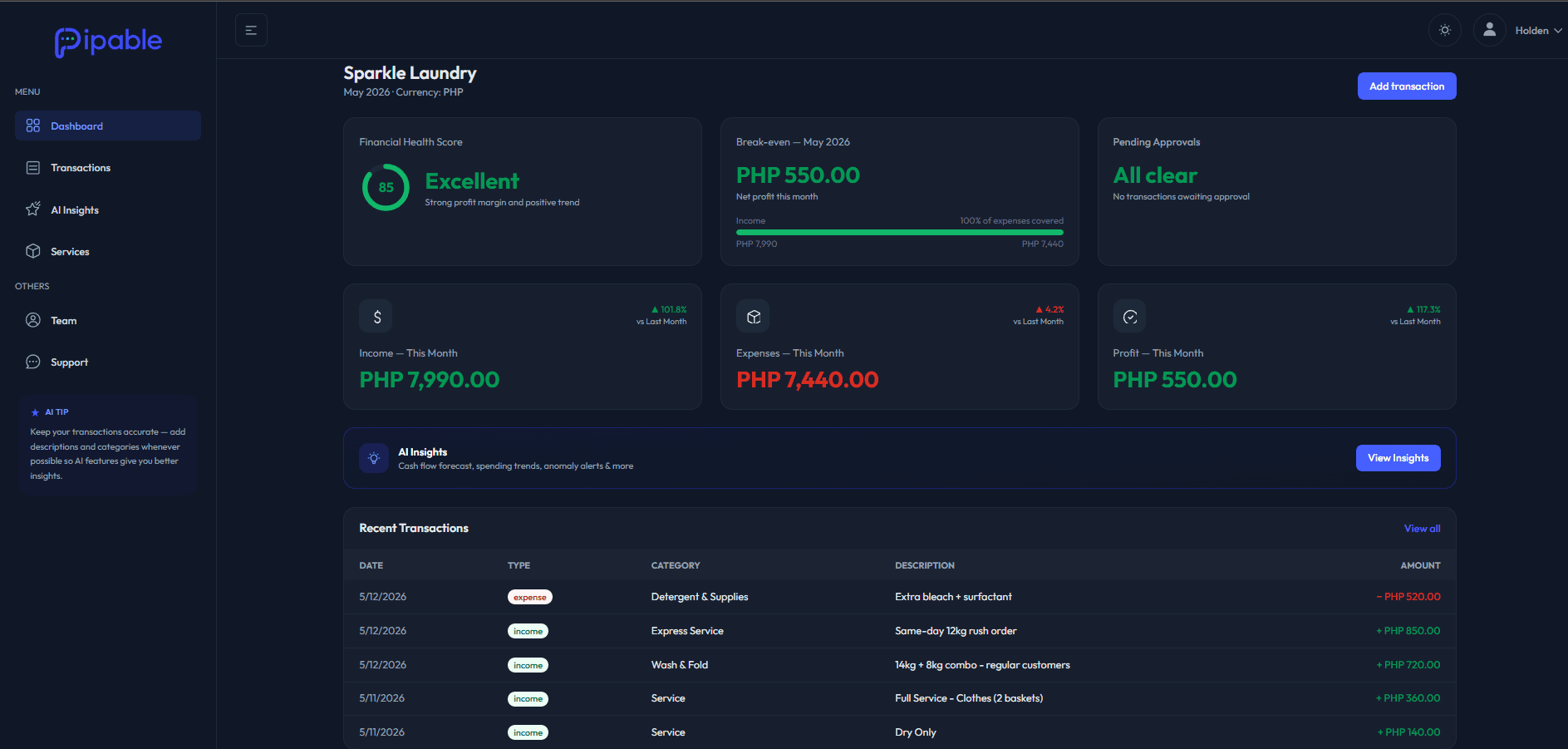
Health score
An auto-calculated 0–100 financial health rating updated in real time. Always know if the business is doing well or not.
Break-even tracker
See exactly how close you are to profitability each month — at a glance, without a spreadsheet.
Focused dashboard
Health score, month-to-date totals, pending approvals, and your last 5 transactions — the daily pulse on one screen.
AI Insights
Insights that actually explain your numbers
Not just charts — real explanations. Pipable's AI reads your transactions and surfaces what matters, so you can act instead of guess.
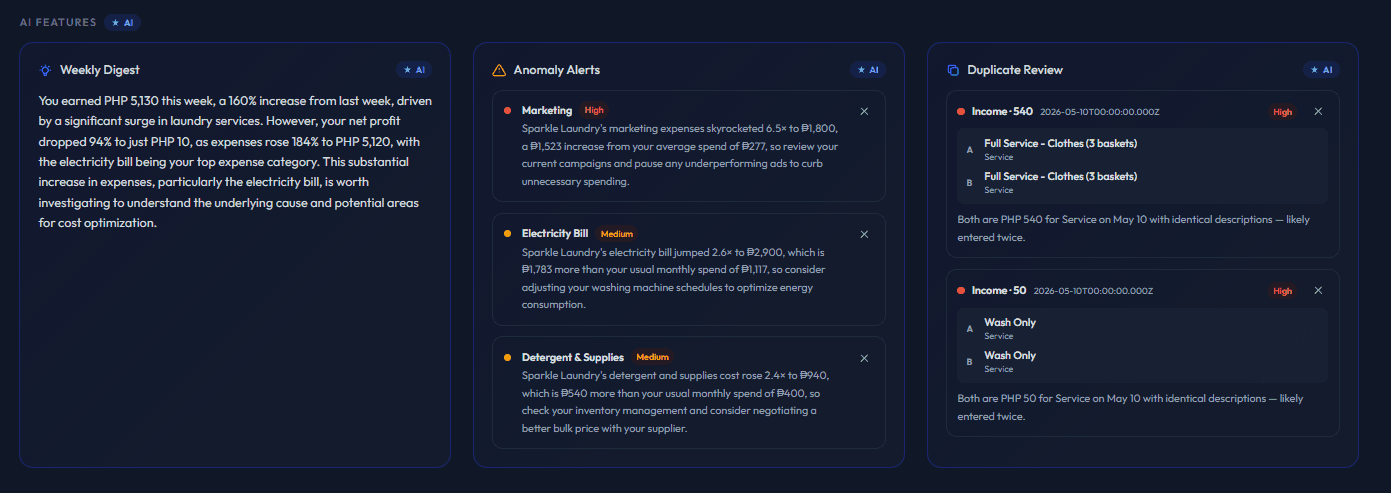
Weekly Digest
A 2–3 sentence AI summary of the past 7 days vs the previous week. Lands every Monday morning.
Anomaly Alerts
Automatically flags expense categories that spike beyond 2× their 3-month average — before you miss it.
Duplicate Review
Catches likely accidentally entered duplicate transactions and surfaces them for your review.
Transaction Analysis
Cash Flow Forecast
Projects your month-end income, expenses, and net based on your current daily run rate.
Spending Trends
Each expense category vs last month with clear % delta badges — see what's creeping up.
Top Sources & Costs
Ranked top-5 income sources and cost drivers with proportional visual indicators.
Recurring Expenses
Identifies categories that appear 2+ months in a row with their average monthly cost.
Yearly Chart
Monthly income vs expenses for the current year, visualised side-by-side.
Category Breakdowns
Income and expense totals grouped by category for the current month.
Generate AI Report
AIA real business report — from your own numbers
One click. 800–1,500 words. No templates, no generic advice — everything is grounded in your actual transaction data. Two report types depending on what you need.
Type 1
Business Report
A full-picture analysis of your business — where money comes from, where it goes, what patterns the AI spots, and what to do about it.
- Executive snapshot
- Monthly rhythm & seasonality
- Top income sources & cost drivers
- Payment behaviour patterns
- Outliers and risk flags
- Actionable recommendations
Type 2
Utility Report
The AI scans your last 6 months of expense transactions and identifies every utility cost — electricity, water, internet, rent, phone, gas, subscriptions, and SaaS tools. Then it tells you exactly what to cut or renegotiate.
What you get
- →Utility Verdict — under control or bleeding money?
- →What You're Paying — grouped by utility type with totals
- →Cut Here — specific guidance on what to cancel, consolidate, or renegotiate
Both report types stream in real time — you see the AI writing the analysis as it works through your data.
Pick the right fit
Exclusive features by business type
Pipable unlocks tools tailored to how your business actually operates. When you sign up, pick the business type that matches you most closely — that's how we decide which features to surface for you.
One feature is exclusive. Rental Management only appears for rental businesses — it doesn't belong in a café or freelance workspace. Everything else, including Sales Snap and CSV import, is available to all business types.
Full rental lifecycle
- Product catalog with daily rate & reservation fee
- Real-time availability (Available / Rented / Inactive)
- Active rental cards with overdue badges
- Partial payment tracking & locked rates
- Mark-as-done auto-creates an income transaction
- Cancel with refund warning
- Full rental history for refunds & disputes
The universal toolkit
Every business type gets the full core experience — transaction tracking, approvals, team management, health score, break-even tracker, the full Insights page, and every AI feature. Business-type-exclusive tools layer on top when they fit.
Not sure which fits? Pick the closest match — you can tell us in the request form and we'll help you choose.
Rental business type
Manage every renter without the spreadsheet chaos
Built for camera rentals, equipment rentals, party rentals, and anything in between. Track products, renters, payments, and overdue returns — all in one place.
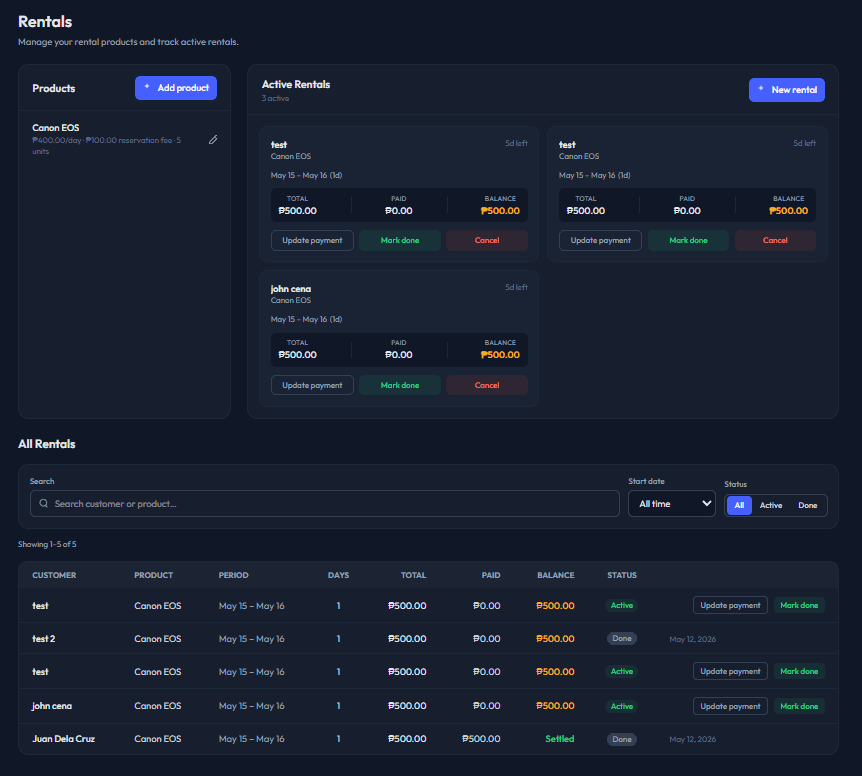
Product catalog
Manage rental items with daily rate, reservation fee, and quantity. Real-time availability — Available, Rented, or Inactive.
Active rentals
See every active rental as a card with customer, period, amount paid, balance owed, and overdue badges.
Payment tracking
Record partial payments as they come in. Reservation fees and daily rates are locked at booking time — no accidental edits.
Mark as done
One tap closes a rental and auto-creates an approved income transaction for the full amount — no double-entry.
Cancel with refund warning
Cancel an active rental without creating fake income. If the customer already paid, you'll be warned to handle the refund.
Rental history
Full history of completed and cancelled rentals with every financial detail — for refunds, disputes, and end-of-year review.
What's next
The roadmap we're shipping next
We build what owners actually ask for. Here's what's coming — and you'll get all of it the moment it ships.
Customer database
Track repeat customers, their lifetime value, and which ones haven't visited in a while.
Inventory tracking
Stock levels, cost of goods sold, and low-stock alerts for retail and food businesses.
Recurring transactions
Auto-create monthly rent, salary, subscriptions — never miss recording a recurring bill again.
Custom reports & exports
Build the report you actually want — by category, payment method, or staff — and export to CSV or PDF.
Mobile app
Native iOS and Android apps. Log a transaction on your phone in 5 seconds, snap a receipt, see your health score on the go.
Who it's for
Any small business that moves money
If you have income and expenses, Pipable fits. No accounting degree needed.
Common questions
Everything you've wondered about AI bookkeeping
What is Pipable?
Pipable is a free AI bookkeeping software for small businesses in the Philippines. You snap a photo of your POS screen or upload a CSV, and the AI automatically logs transactions, detects anomalies, and sends you a weekly business health report — no manual data entry required.
How does automated bookkeeping work in Pipable?
Pipable uses AI to read your POS screen photos (Sales Snap) or parse CSV/Excel exports. It extracts dates, amounts, and payment methods, then categorises and logs each transaction automatically. You review and approve entries — the AI handles the data entry.
Is Pipable really free?
Yes. Every feature — Sales Snap, CSV import, AI weekly digest, business reports, rental management, and team approvals — is included at no cost. Some features may move to paid plans in the future; signing up now locks in free access.
Does Pipable work with GCash?
Yes. Snap a photo of your GCash transaction history or import the CSV export. Pipable reads each payment, categorises it as income, and reconciles it with your cash sales in a single daily view.
Can Pipable replace QuickBooks or Wave for a small Philippine business?
For most small businesses in the Philippines, yes. QuickBooks and Wave require you to manually enter every transaction and are designed for businesses with accountants. Pipable is built for owners who don't have time — the AI does the data entry from a photo or CSV, then gives you a plain-language weekly report.
Do I need an accountant to use Pipable?
No. Pipable is designed for business owners, not accountants. The AI explains your numbers in plain language, flags anything unusual, and tells you each week whether your business is earning. No accounting knowledge required.
Open to everyone
Sign up free — no invite needed
Pipable is now open to all small businesses. Create your workspace in minutes, invite your team, and get your first AI report running today.
Currently free
Every feature — Sales Snap, CSV import, AI insights, Business Report, Rental Management, team approvals — is free right now. Some features will move to paid plans in the future.
Up and running in minutes
Sign up, pick your business type, invite your team, and log your first transaction. No setup calls, no onboarding sessions.
Built for small businesses
Café, laundry, salon, rental shop, repair store, freelancer, food cart, e-commerce — if you have income and expenses, Pipable fits.
Start for free today
No credit card. No invite code. Full access to every feature from day one.
Create your free account →Already have an account? Sign in